


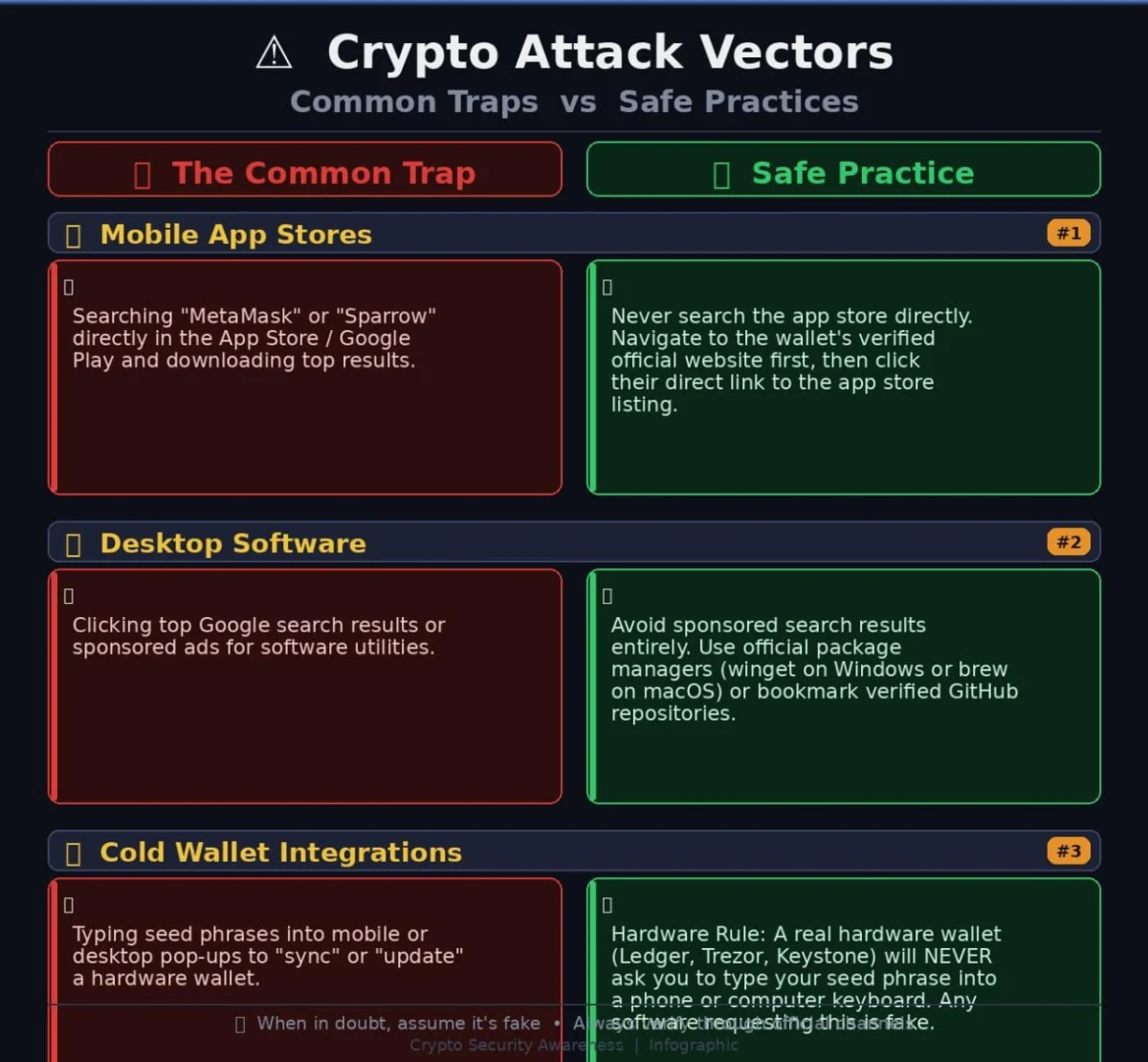
The proliferation of cryptocurrency theft, often measured in staggering dollar figures, has unfortunately become a regular feature of the digital landscape. While the sheer scale of these losses can induce a kind of professional detachment, recent incidents have pierced through that numbness, not primarily due to the amounts involved, but because of the glaringly avoidable nature of the underlying vulnerabilities. Within days of each other, three distinct vectors of crypto theft surfaced, collectively highlighting an uncomfortable truth: the very platforms users have been conditioned to trust implicitly – Apple’s App Store, Google Play, and Google Search itself – are proving to be the most exploitable weak links in crypto security, rather than the underlying blockchain technology. This systemic failure in curation and trust poses a significant threat to digital asset holders and casts a long shadow over the promise of widespread crypto adoption.
The Apple App Store: A Lawsuit Exposing a Decade-Old Blind Spot
On July 24, a significant lawsuit was filed against Apple in California, brought by three plaintiffs – James Ramirez, Christopher Ellis, and Jalen Delgado. They allege that a sophisticated fake application, masquerading as the legitimate Sparrow Wallet, duped them into divulging their critical seed phrases. These seed phrases, the master keys to cryptocurrency holdings, were then exploited to drain approximately $1.8 million in Bitcoin from their accounts between May and August of 2025. Specifically, Ramirez reported losses of about $875,000, Ellis $840,000, and Delgado $120,000.
The most damning detail in this case, and indeed a critical piece of evidence regarding Apple’s alleged negligence, is the fundamental nature of Sparrow Wallet itself. Sparrow Wallet is a desktop-only application, designed exclusively for Windows, macOS, and Linux operating systems. Its creator, Craig Raw, has never developed or released an iOS version. This means that any Sparrow Wallet application appearing on the App Store is, by definition, a fraudulent impersonation. Despite this unequivocal fact, the lawsuit contends that Apple not only approved this fake app for distribution but went further by featuring it within its own "curated cryptocurrency collections," effectively lending it an unwarranted seal of authenticity.
Adding to the gravity of the situation, this was not an isolated or unforeseen oversight. Craig Raw, the legitimate developer of Sparrow Wallet, had reportedly flagged an identical impersonator application in previous years. Rather than taking decisive action against the fraudulent entity, Apple’s response allegedly included flagging Raw’s own legitimate developer account – a move that appears to have penalized the victim rather than the perpetrator. While Apple has stated publicly that it acted swiftly to remove the impersonating apps and terminate the associated developer accounts, the lawsuit disputes this, claiming that other fake Sparrow apps remained live even after being reported.
This incident is not an anomaly but a documented, repeating pattern of failure. Earlier this year, a similar Ledger Live impersonator app on the App Store was responsible for draining an estimated $9.5 million from unsuspecting victims. The recurring nature of these high-value exploits raises serious questions about the efficacy and diligence of Apple’s app review process, particularly concerning high-stakes financial applications like cryptocurrency wallets. The company’s reputation for stringent security and meticulous curation, a cornerstone of its brand identity, is increasingly being challenged by these persistent vulnerabilities.
SparkKitty: Turning Camera Rolls into Crime Scenes
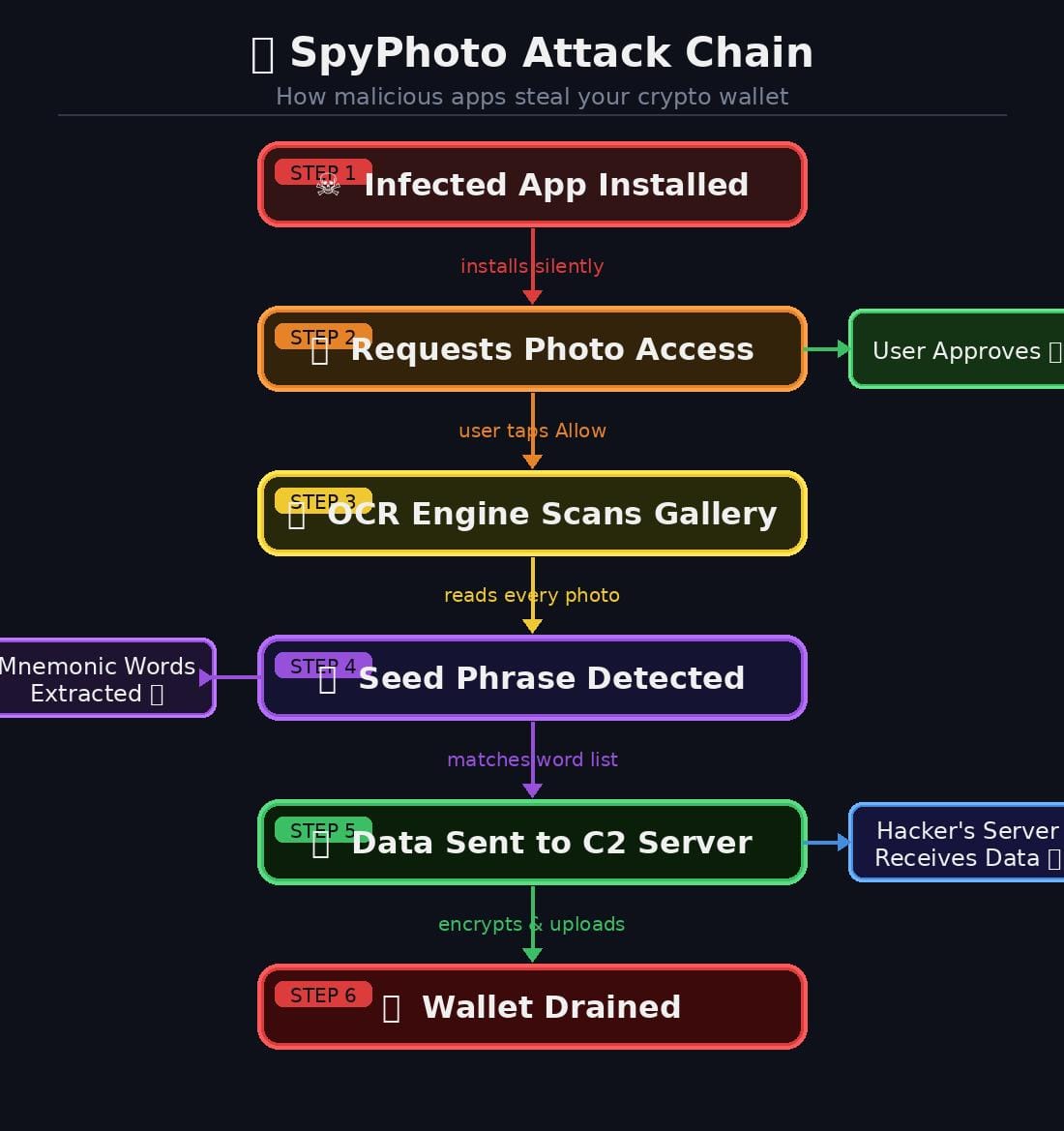
Concurrent with the unfolding legal battle against Apple, cybersecurity firm Check Point published a detailed report on a new and insidious malware family dubbed SparkKitty. This cross-platform threat, impacting both Android and iOS devices, introduces a disturbingly simple yet highly effective method for credential theft: it scans photos stored on infected devices using Optical Character Recognition (OCR) technology. The malware’s objective is to hunt for cryptocurrency wallet seed phrases or recovery phrases, allowing attackers to extract these critical credentials without needing to employ more complex methods like keystroke logging or clipboard monitoring.
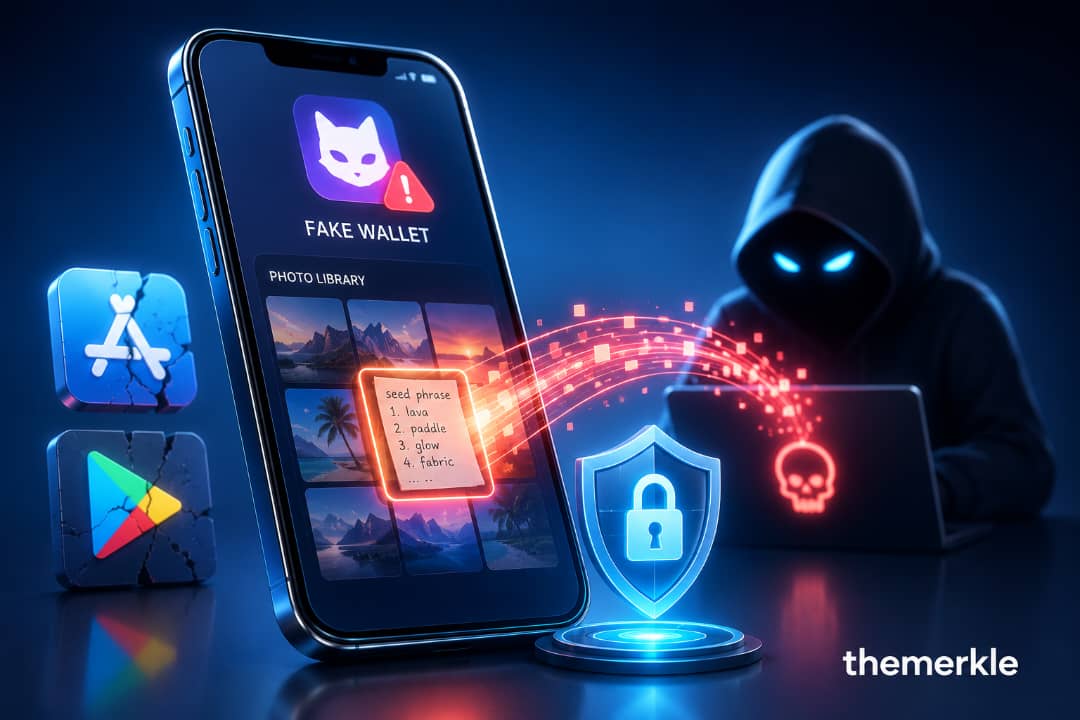
SparkKitty is described as an evolved variant of SparkCat, an OCR-based stealer first documented by Kaspersky in 2025, which also targeted data from screenshots. Its deceptive nature allowed it to bypass standard app review processes on both major mobile platforms. On iOS, SparkKitty was found embedded within a seemingly innocuous crypto application named "å coin." The malware meticulously concealed its malicious code, successfully navigating Apple’s review mechanisms before requesting access to the user’s photo library – a seemingly benign request for many users accustomed to apps requiring image access for profile pictures or document uploads.
On Android, the malware manifested within an application called SOEX, which was marketed as a messaging and crypto exchange platform. Before its eventual removal, SOEX had garnered over 10,000 downloads on Google Play. Beyond official app stores, SparkKitty also propagated through more illicit channels, including pirated APKs, modified TikTok applications, and various online betting platforms.
The mechanism behind SparkKitty’s success is almost insultingly straightforward. Users grant photo access, often with the assumption that it’s for an legitimate feature like uploading a profile picture or scanning a document. Once permission is granted, the app silently uploads the entire photo gallery to a remote server, where it is then scanned using OCR for any sequence of words resembling a 12- or 24-word seed phrase. Should a match be found, the associated cryptocurrency wallet can be emptied within minutes. The devastating consequence for victims is the absolute finality of blockchain transactions: there is no bank, no chargeback, and no reversal process to recover lost funds.
The Swarm of Fake Wallets Hiding in Plain Sight
Beyond the sophisticated malware of SparkKitty, researchers have independently identified another alarming trend: a proliferation of overtly fake wallet applications on both the App Store and Google Play. At least 26 such apps have been found impersonating industry giants like MetaMask, Trust Wallet, and Coinbase. These fraudulent applications meticulously copy the legitimate logos, branding, and user interfaces of their authentic counterparts, often incorporating only tiny, almost imperceptible spelling variations or subtle design differences to slip past casual scrutiny.
This particular vector of attack should be of profound concern to all cryptocurrency users because, unlike SparkKitty’s covert gallery scan, these apps require no complex exploits. The trickery lies solely in social engineering and deception. Users, believing they are interacting with a legitimate wallet, are prompted to enter their existing seed phrase directly into the fake interface or create a new "wallet" which then generates a seed phrase that is immediately compromised. In essence, victims are convinced to voluntarily hand over their funds or access credentials, requiring no malware trickery beyond convincing branding and a well-executed impersonation. The ease with which these apps gain traction and the sheer volume of their presence underscore a significant lapse in platform oversight.
Desktop Vulnerabilities: Windows Users Are Not Immune
For those who might assume that managing cryptocurrency on a desktop environment offers a safer haven, the reality is equally bleak. A recent report on X revealed that more than 70 fake websites are actively impersonating popular Windows applications. These include widely used tools such as PowerToys, CrystalDiskMark, EasyBCD, Lively Wallpaper, Wintoys, SignalRGB, and MKVToolNix. Disturbingly, many of these malicious lookalike domains have achieved higher rankings than the legitimate project pages in Google search results, effectively weaponizing the primary means by which billions of users discover and download software.
The playbook employed by these campaigns is both patient and deliberately deceptive. Initially, the fake sites focus on building strong search engine rankings for the names of popular applications. They often appear harmless in their early stages, linking to the genuine download source for the software. This strategy allows them to accumulate traffic and build a semblance of trust with search algorithms and users. Only after establishing sufficient visibility and credibility do the attackers swap the legitimate download links for malicious installers, often containing trojanized software.
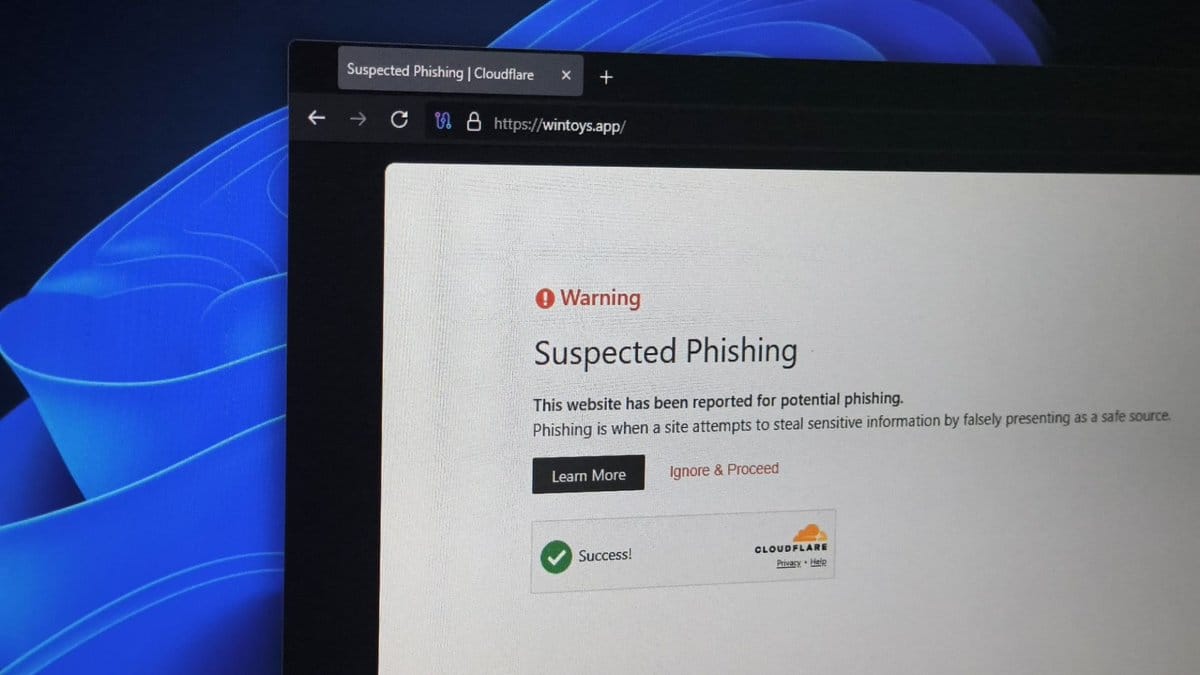
Check Point has already traced several malware families, including RemusStealer, to these campaigns. Developers behind popular applications like Lively Wallpaper and SignalRGB have independently confirmed active impersonation attempts specifically targeting their projects. The most unsettling aspect of this campaign is its broad applicability: it is not exclusively crypto-specific. This infrastructure is designed to compromise anyone downloading common software. Crypto wallets or exchange credentials stored on an infected machine simply represent one of the most valuable potential payoffs once the trojanized installer has run its course, providing attackers with access to a wide array of sensitive data.
The Systemic Failure: Why This Keeps Happening Across Every Platform
These three seemingly disparate stories – the Apple App Store lawsuit, the SparkKitty malware, and the desktop search engine poisoning – are not isolated incidents. They represent manifestations of the same fundamental underlying failure, recurring across different platforms. App stores and search engines have meticulously cultivated their reputations on the pillars of curation and trust. Attackers have keenly identified that exploiting this established trust, by impersonating a trusted brand or legitimate service, is often far simpler and more effective than attempting to break complex cryptographic security measures.
Apple’s vaunted app review process demonstrably failed to identify and block an app that had no legitimate reason to exist on iOS, despite prior warnings. Google Play hosted an application that brazenly uploaded users’ entire photo libraries without triggering sufficient scrutiny for rapid removal. And Google Search, the default tool for billions seeking digital information and software, is actively surfacing malicious sites above the authentic ones.
The common advice, "just Google the app name and download it," or "search the App Store," was once a reasonable and practical guideline for digital hygiene. It genuinely is no longer. The digital ecosystem has evolved to a point where the very mechanisms designed to facilitate discovery and ensure safety are being weaponized against the end-user. This erosion of trust in foundational digital platforms represents a critical juncture for both technology companies and their users.
Implications for User Trust and Platform Responsibility
The implications of these recurring vulnerabilities are profound. For cryptocurrency, an industry already battling skepticism and regulatory scrutiny, these incidents undermine confidence in the security of digital assets, even when the underlying blockchain technology remains robust. Mainstream adoption of crypto hinges on users feeling secure in their interactions, and when the most trusted gateways to software – app stores and search engines – are compromised, it erects significant barriers.
For Apple and Google, these incidents challenge the very foundation of their business models: providing a safe and curated digital environment. While these companies invest heavily in security, the scale and sophistication of current threats, coupled with the sheer volume of content they must moderate, appear to be overwhelming existing safeguards. The lawsuits and public outcry serve as a potent reminder of the legal and reputational risks associated with these systemic failures. A renewed focus on proactive threat intelligence, more rigorous review processes, and perhaps a re-evaluation of the "curation" model itself may be necessary.
Defensive Strategies: A Comprehensive Guide for Crypto Users
Understanding the mechanics of these attacks is only valuable if it translates into tangible changes in user behavior and security habits. As the digital landscape grows more treacherous, a proactive and disciplined approach to security is paramount for anyone holding digital assets. Here is a breakdown of emerging attack vectors, coupled with a robust action plan to neutralize them effectively.
1. Securing Digital Assets from OCR Malware (SparkKitty)
SparkKitty exemplifies a stealthy, cross-platform threat that leverages Optical Character Recognition to extract sensitive information from images. Disguised as seemingly benign messaging tools, gambling applications, or even legitimate-looking crypto utilities, it bypasses standard review processes by concealing its malicious payload. Once installed, it gains access to the photo library and silently scans for the distinctive patterns of 12- or 24-word seed phrases.
- Prevention Checklist:
- Review App Permissions Diligently: Before installing any new app, and periodically for existing ones, scrutinize the permissions it requests. An app that purports to be a crypto wallet or a simple utility should not require extensive access to your photo library unless its core functionality explicitly demands it (e.g., a photo editing app). Be highly suspicious of any crypto-related app requesting broad photo access.
- Store Seed Phrases Offline and Securely: Your seed phrase is the ultimate key to your crypto. It should never be stored digitally on any internet-connected device, including in your camera roll, cloud storage, notes apps, or even as a screenshot. Write it down on paper and store it in a secure, fireproof, and waterproof location, preferably in multiple locations. Consider metal seed phrase plates for enhanced durability.
- Disable Unnecessary Photo Access: For apps that genuinely need photo access for a specific function, consider revoking that access once the task is complete. Regularly review your device’s privacy settings to ensure only essential apps have access to your photo library.
- Use Dedicated Devices for Crypto (Advanced): For significant crypto holdings, consider using a dedicated smartphone or computer that is never used for general browsing, social media, or other potentially risky activities. This creates an air-gapped or semi-air-gapped environment for your most sensitive assets.
2. Navigating App Stores and Search Engines Safely
The recent lawsuit against Apple involving a non-existent iOS version of Sparrow Wallet, alongside the discovery of 26 fake apps mimicking MetaMask, Trust Wallet, and Coinbase, underscores the pervasive danger of impersonation. Simultaneously, malvertising campaigns on desktop search engines are deliberately positioning lookalike sites above genuine open-source tools, leading users to download trojanized software. When an app or download link appears convincing, standard visual checks are often insufficient. A strict verification protocol is essential before entering credentials or downloading any software.
- Prevention Checklist:
- Direct Navigation to Official Sources: Never rely on search engines or direct links from unverified sources for downloading crypto wallets or other critical financial software. Always navigate directly to the official website of the project or company by typing the URL yourself. Bookmark these official sites for future use.
- Verify App Developer Information: On app stores, meticulously check the developer’s name, website, and other details. Scammers often use subtle variations or generic developer names. Cross-reference this information with the official project website.
- Read Reviews and Scrutinize Ratings: While not foolproof, a pattern of negative reviews, recent creation dates, or generic, overly positive reviews can be red flags. Be wary of apps with very few reviews or suspiciously high ratings that seem artificial.
- Utilize Checksums and Signature Verification (Desktop): For desktop software downloads, always look for checksums (e.g., SHA256 hashes) provided on the official website. After downloading, verify the integrity of the downloaded file against the published checksum. More advanced users can also verify digital signatures if provided.
- Hardware Wallets for Cold Storage: For substantial crypto holdings, invest in a reputable hardware wallet (e.g., Ledger, Trezor). These devices store your private keys offline, making them immune to software-based attacks like SparkKitty or fake apps. Transactions are signed on the device itself, providing an additional layer of security.
3. The Modern Crypto Hygiene Playbook
App stores and search engines, which built their reputations on curation and trust, are increasingly becoming vectors for sophisticated attacks. Attackers have learned that exploiting this inherent trust is often far easier than attempting to crack robust cryptography. The common advice, "Just Google it" or "Search the App Store," is no longer safe when dealing with crypto software.
- Key Rules for Daily Protection:
- Assume Compromise, Verify Everything: Adopt a "zero-trust" mindset. Assume that any link, email, or application could be malicious until proven otherwise. Double-check every URL, every app developer, and every transaction detail.
- Enable Two-Factor Authentication (2FA) Everywhere: Implement 2FA on all your crypto exchanges, email accounts, and any other platform that could grant access to your digital assets. Prefer hardware-based 2FA (e.g., YubiKey) or authenticator apps over SMS-based 2FA, which is more susceptible to SIM-swapping attacks.
- Use Strong, Unique Passwords: Employ a robust password manager to create and store unique, complex passwords for every online account. Never reuse passwords.
- Keep Software Updated: Regularly update your operating systems, web browsers, and all applications. Security updates often patch critical vulnerabilities that attackers could exploit.
- Be Skeptical of Unsolicited Communications: Be extremely wary of unsolicited emails, messages, or calls offering crypto-related advice, support, or promotions. These are frequently phishing attempts.
- Educate Yourself Continuously: The threat landscape in crypto is constantly evolving. Stay informed about the latest scams, malware, and best security practices. Reputable crypto news sources and security blogs are invaluable resources.
- Use Dedicated Browsers (Advanced): Consider using a specific, hardened web browser exclusively for crypto-related activities, separate from your general browsing. This reduces the attack surface from malicious websites or browser extensions.
The underlying technology securing public blockchains remains remarkably robust and resistant to direct attack. However, the human interface layers – the app stores, search engines, and operating systems that bridge users to these decentralized networks – have become the primary points of exploitation. By shifting trust away from third-party app store curation, implementing strict verification habits, and adopting a comprehensive personal security playbook, users can significantly reduce their risk, ensuring that the platforms surrounding their crypto do not become their single point of failure. The responsibility for securing digital assets increasingly falls to the individual, demanding heightened vigilance and proactive measures in an ever-evolving digital frontier.