


The landscape of artificial intelligence is undergoing a significant transformation, with open-weight AI models rapidly closing the performance gap with their proprietary, closed-source counterparts. On average, these accessible models now trail the industry’s best by merely about four months, a testament to the accelerated pace of innovation within the open-source community. Crucially, a growing number of these sophisticated models are designed to run efficiently on hardware commonly found in personal computers, heralding a new era of decentralized AI. This shift empowers individuals and organizations to harness advanced AI capabilities without relying on expensive cloud subscriptions or relinquishing control over their data.
The Democratization of AI: Understanding Open-Weight Models
At its core, an "open-weight" AI model is one where the developing entity publishes the "weights"—the vast collection of numerical parameters that represent everything the model has learned during its training. These files, essentially the model’s brain, can be freely downloaded, inspected, and executed by anyone. This stands in stark contrast to "closed" models, where these weights are proprietary secrets, accessible only via API calls to the provider’s servers. The availability of these weights is a game-changer, fostering transparency, enabling community-driven development, and allowing for unprecedented levels of customization.
The emergence of user-friendly platforms like Ollama and LM Studio has further simplified the process of deploying these models locally. These free programs act as intermediaries, allowing users to effortlessly download model weights and run them on their own machines. For instance, Google’s Gemma 4, a powerful open-weight model, is available in Ollama’s library in various sizes, with downloads ranging from approximately 4.6GB to 20GB. This accessibility means that individuals no longer need to pay recurring monthly subscriptions, often around $20, for AI chatbot services, nor do they need to transmit their sensitive conversations to external servers. This guide delves into the mechanics of downloading and running AI models directly on your computer, outlines the necessary hardware specifications, and provides a comprehensive overview of how to get started with these free and powerful tools. Whether the motivation is financial prudence, an imperative for privacy, or a desire to experiment and customize AI models, setting up a local AI assistant is becoming increasingly straightforward.
The Imperative for Local AI: Privacy, Cost, and Control
The decision to run an AI model on a personal machine rather than relying on cloud-based services is often driven by compelling arguments centered on privacy, cost-effectiveness, and enhanced control. In an era where data privacy is paramount, the distinction between local and cloud-based AI becomes critical.
Uncompromised Privacy: A fundamental concern with cloud chatbots is that every prompt and interaction is transmitted to and processed on a company’s remote servers. This centralized data handling raises significant privacy implications. For example, a court order compelled OpenAI to preserve ChatGPT logs, including conversations users believed they had deleted, as reported by Decrypt in its review of privacy-focused AI tools. Such incidents highlight the potential for user data to be accessed, stored, or even misused without explicit consent or awareness. In contrast, a locally hosted AI model keeps all conversations and data strictly on the user’s computer. This architecture ensures that no external entity can access or utilize the data without the user’s explicit permission, offering a robust shield against surveillance, data breaches, and unwanted data exploitation. LM Studio’s documentation explicitly states that the application can "operate entirely offline," provided model files are pre-downloaded, and even documents attached to a chat can be processed completely offline, reinforcing its privacy credentials.
Economic Accessibility: Beyond privacy, the financial aspect plays a significant role. While subscriptions to premium cloud-based chatbots typically cost around $20 per month, the software required to run open-weight models locally—such as Ollama and LM Studio—is entirely free. This shifts the cost burden from recurring subscriptions to a one-time investment in hardware, which many users may already possess. Over time, these monthly savings can accumulate significantly, making advanced AI capabilities more economically accessible to a broader audience, including students, independent developers, and small businesses.
Unfettered Control and Customization: Open-weight models offer an unparalleled degree of control and customization. The underlying licenses dictate what users can do with the downloaded weights. For instance, DeepSeek’s R1 series, released under the permissive MIT License, explicitly allows for "commercial use, any modifications and derivative works." Similarly, Google’s Gemma 4 and OpenAI’s gpt-oss models are distributed under Apache 2.0, another widely recognized open-source license. Operating under such licenses grants users the freedom to use, modify, and distribute the models as they see fit. This flexibility is invaluable for developers and researchers who wish to fine-tune models for specific applications, remove unwanted biases, or integrate them into proprietary systems without licensing constraints. For example, a user might require a model highly proficient in medical diagnostics and can thus customize an open-weight model by training it on specialized datasets, a level of personalization simply unavailable with black-box cloud services. This ability to tailor AI to precise needs fosters innovation and allows for the creation of highly specialized, domain-specific AI assistants.

Understanding Open-Weight Licenses and the Ecosystem
The availability of open-weight models is underpinned by specific licensing frameworks that govern their use, modification, and distribution. These licenses are crucial in defining the scope of freedom users have, impacting everything from commercial applications to research and development.
The Role of Licenses: The "weights" of an AI model represent the numerical values that are adjusted during its training process. These values encapsulate the model’s learned patterns, knowledge, and capabilities. When a company publishes these weights, the accompanying license dictates the terms.
- MIT License: As seen with DeepSeek’s R1 series, the MIT License is one of the most permissive open-source licenses. It grants users the freedom to use, copy, modify, merge, publish, distribute, sublicense, and/or sell copies of the software, with minimal restrictions, primarily requiring the inclusion of the original copyright and permission notice. This makes it highly attractive for commercial ventures and extensive modifications.
- Apache 2.0 License: Google’s Gemma 4 and OpenAI’s gpt-oss models are released under the Apache 2.0 License. This license is also quite permissive, allowing commercial use, modification, distribution, and patent grants. It’s known for providing a clear legal framework and protecting contributors from patent litigation, making it a popular choice for large organizations.
- Other Licenses: It’s important to note that not all "open" models are equally permissive. Meta’s Llama series, for example, initially used a custom research-focused license before transitioning to a more commercially friendly one for Llama 2, still with some usage restrictions for very large companies. Understanding these nuances is vital for users and developers.
Why Companies Embrace Open-Weight: The decision by major technology companies to release powerful models as open-weight is multifaceted.
- Community Engagement and Innovation: By opening up their models, companies can tap into the collective intelligence of the global developer community. This leads to rapid bug fixes, performance improvements, and the creation of novel applications that the original developers might not have envisioned.
- Talent Attraction: Companies known for their open-source contributions often find it easier to attract top-tier AI talent, as developers are drawn to environments that foster collaboration and transparency.
- Ecosystem Building: Releasing open-weight models can help establish a company’s technology as an industry standard, fostering an ecosystem of tools and applications built around it. This can indirectly benefit the company through increased adoption of its other products or services.
- Competitive Pressure: The rapid advancements in the open-source community exert pressure on proprietary AI developers to either open up their models or constantly innovate to maintain a lead.
The Central Role of Hugging Face: Hugging Face has emerged as a pivotal hub in the open-source AI ecosystem. It hosts a vast repository of models, datasets, and demos, serving as the primary platform where developers publish and discover open-weight models. Tools like LM Studio directly integrate with Hugging Face’s model library, allowing users to easily browse, download, and manage models from a single interface. This centralized resource greatly facilitates the adoption and spread of open-source AI technologies.
Demystifying Hardware Requirements for On-Device AI
Successfully running AI models locally hinges on understanding and meeting specific hardware requirements, particularly concerning memory. The capability of a machine to run a model is primarily determined by its available video memory (VRAM) for GPUs or unified memory for integrated architectures like Apple Silicon.
Parameters and Memory Footprint: AI models are characterized by their number of "parameters"—the internal numerical values that are adjusted during the model’s training. Generally, the more parameters a model has, the more complex and capable it is, but also the larger its file size and the greater its memory demands. These models must fit entirely within your graphics card’s VRAM or, in the case of Macs, the unified memory shared by the CPU and GPU.
VRAM as the Bottleneck: As a general guideline, a minimum of 8GB of VRAM is typically recommended for running smaller to medium-sized quantized models. However, for serious users aiming to run larger, more capable models or multiple models simultaneously, a gaming GPU with 24GB of VRAM or more is highly advisable. High-end consumer GPUs like the NVIDIA RTX 3090 or RTX 4090 are popular choices due to their substantial VRAM. For enterprise-level or professional use, solutions like stacking multiple GPUs or investing in dedicated AI racks or specialized machines with unified memory, such as the Mac Mini (especially models with M-series chips and higher memory configurations) or NVIDIA DGX Spark, become necessary.
The Role of Quantization: To make larger models more accessible on consumer hardware, a technique called "quantization" is employed. Quantization shrinks a model’s memory footprint by representing its weights and activations with fewer bits. Hugging Face’s documentation explains this as storing weights and activations "with low-precision data types like 8-bit integer (int8) instead of the usual 32-bit floating point (float32)." This reduction in precision significantly cuts down memory usage, allowing larger models to fit into less VRAM, albeit often at the cost of a slight, often imperceptible, decrease in accuracy. Common quantization levels include Q4_K_M (4-bit), Q5_K_M (5-bit), and Q8_0 (8-bit), each offering a different balance between size and precision.

Specific System Requirements for Tools:
- LM Studio: For Apple Silicon Macs running macOS 14 or newer, LM Studio recommends 16GB or more of unified RAM. While 8GB Macs can handle smaller, more heavily quantized models, performance will be limited. Intel-based Macs are explicitly not supported due to architectural differences. For Windows, the recommendation is at least 16GB of system RAM, 4GB of dedicated VRAM, and a processor with AVX2 support.
- Ollama and Model Sizes: The memory requirements vary by model. For instance, Ollama’s library lists Gemma 4 26B as requiring 16 to 19GB of memory and the 31B version needing 19 to 20GB. OpenAI’s gpt-oss-20b requires 16GB, while its larger gpt-oss-120b can run within 80GB of memory, according to OpenAI. These figures underscore the necessity of sufficient VRAM or unified memory for smooth operation. When a model’s memory demands exceed available VRAM, it "spills over" into slower system RAM, leading to a noticeable degradation in response times and overall performance.
Getting Started: A Practical Guide to Ollama and LM Studio
Deploying open-weight AI models locally is made accessible through user-friendly applications like LM Studio and Ollama. While both serve the same fundamental purpose, they cater to slightly different user preferences and technical proficiencies.
LM Studio: The Graphical User Interface (GUI) Champion
LM Studio is widely regarded as the go-to choice for users who prefer a polished, intuitive graphical interface. It simplifies the entire process, from model discovery to interaction.
- Download and Install: Begin by downloading the appropriate installer for your operating system (Windows, macOS, Linux) from the official lmstudio.ai website. The installation process is typically straightforward, following standard application installation procedures.
- Model Discovery: Once installed, open LM Studio. The application features an integrated search interface that allows you to browse and discover a vast array of open-weight models hosted on Hugging Face, the leading platform for AI models. You can filter models by size, architecture, and other criteria.
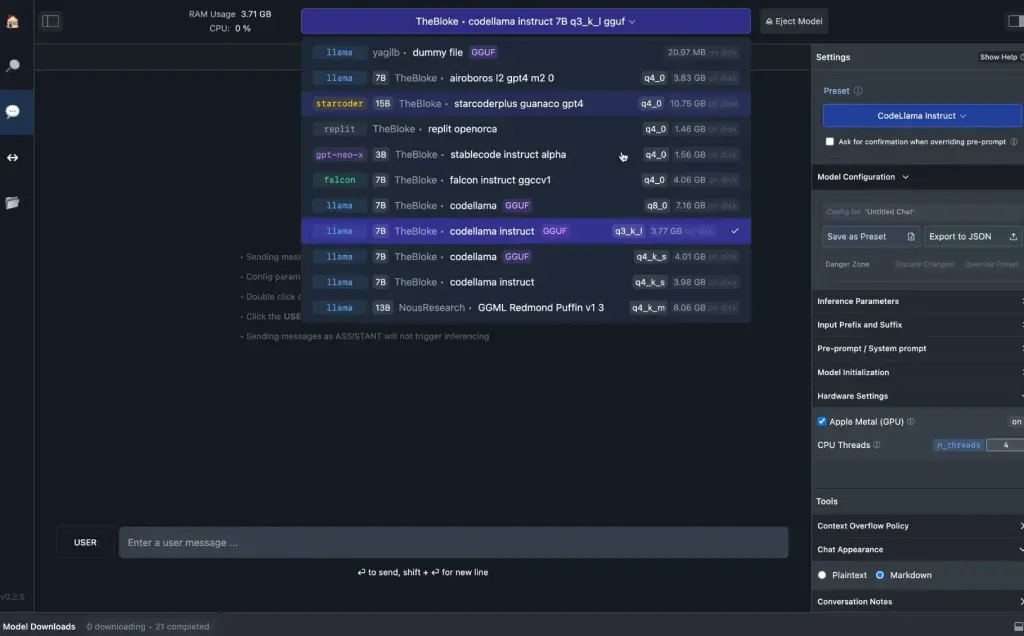
- Download Weights: Select your desired model and click to download its weights. LM Studio handles the entire download and local storage process. It often presents various quantized versions of a model, allowing you to choose one that fits your hardware’s memory capacity.
- Start Chatting: After the download is complete, navigate to the chat interface within LM Studio. You can select your downloaded model and immediately begin interacting with it, much like a cloud-based chatbot. LM Studio also supports loading local documents for context, which can be processed entirely offline, enhancing privacy.
Ollama: The Developer’s Command-Line Interface (CLI) Tool
Ollama is designed for developers and more experienced users who are comfortable working within a terminal or command-line interface. It’s particularly powerful for integrating AI models into other applications or scripting automated tasks.
- Installation:
- macOS and Linux: Open your terminal and execute the command:
curl -fsSL https://ollama.com/install.sh | sh. - Windows: Open PowerShell as an administrator and run:
irm https://ollama.com/install.ps1 | iex.
Both commands are available on Ollama’s official download page.
- macOS and Linux: Open your terminal and execute the command:
- Model Download and Interaction:
- Once Ollama is installed, you can download models using a simple command. For example, to download a specific version of Gemma 4, you would type:
ollama pull gemma4:e2b. - To initiate a chat session with the downloaded model, use:
ollama run gemma4:e2b. You can then type your prompts, and the model will respond in the terminal. To exit the chat, simply type/bye.
- Once Ollama is installed, you can download models using a simple command. For example, to download a specific version of Gemma 4, you would type:
- Local API Integration: A key feature of Ollama is its ability to automatically expose a local API at
http://localhost:11434. This means other applications running on your machine can programmatically send prompts to and receive responses from the locally hosted AI models, enabling seamless integration into custom workflows, desktop applications, or even web interfaces you build. - Cloud vs. Local Models in Ollama: Ollama’s library also lists "cloud models" (e.g.,
gemma4:cloud). These models run in Ollama’s cloud environment and do not require a local download. While convenient for those needing more powerful models without local hardware constraints, users prioritizing privacy should skip these, as interactions are sent to a remote server. However, it’s worth noting that for such cloud-API calls, providers like Ollama often emphasize that prompts are not stored or used for model training, offering a "second-best" privacy option when local hardware is insufficient.
Advanced Features and Performance Enhancements:
Recent advancements are making local AI even more capable. Google’s Multi-Token Prediction drafters for Gemma 4, available on Ollama under Apache 2.0, can significantly speed up generation by up to three times without requiring new hardware. This is achieved through "speculative decoding," where a smaller, faster model proposes several tokens ahead, and the larger, more accurate model then checks them together. If the larger model agrees with the draft, it accepts the entire sequence in a single forward pass, then adds one additional token of its own in that same pass. This parallel processing dramatically reduces inference time.
Furthermore, local models are gaining sophisticated capabilities like web search and file access through Model Context Protocol (MCP) servers. LM Studio, for example, added support for MCP in version 0.3.17, allowing locally run models to fetch real-time information from the internet or interact with local documents in a more dynamic way, bridging some of the functionality gaps with cloud-based services.
The Road Ahead: Advantages and Current Limitations of Local AI
While the rapid advancement of open-weight AI models and the tools to run them locally are democratizing access to powerful intelligence, it is crucial to acknowledge both their burgeoning advantages and their current limitations when compared to cutting-edge cloud-based solutions.
Bridging the Performance Gap: The "four-month average" performance gap highlighted at the outset refers to the most capable open models. This signifies an extraordinary pace of progress within the open-source community, where iterative improvements and diverse contributions quickly bring these models to near-parity with their commercial counterparts. This rapid convergence means that for a vast majority of common AI tasks—from text generation and summarization to coding assistance and creative writing—local open-weight models can offer performance that is more than sufficient for everyday use. The advantage lies in the immediate availability, the zero recurring cost, and the complete data privacy.
Challenges with Frontier Models: However, this four-month average does not apply universally to the absolute largest and most advanced "frontier" models. These behemoths often possess trillions of parameters and require colossal computational resources that far exceed typical consumer hardware capabilities. For instance, Alibaba’s Qwen3.8-Max boasts 2.4 trillion total parameters, with 95 billion active at any given time. Such models demand specialized data centers, massive GPU clusters, and sophisticated memory management, making local deployment impractical or impossible for the average user. While OpenAI’s gpt-oss-120b can run within 80GB of memory, even this is a significant demand that only very high-end consumer GPUs or professional workstations can meet.
Performance Bottlenecks and Context Windows:
- VRAM Spillover: One of the most significant performance caveats for local models occurs when a model’s memory requirements exceed the available VRAM on the graphics card. In such scenarios, the model "spills" its excess data into the much slower system RAM. This dramatic shift in memory access speed can cause responses to become significantly delayed, turning an otherwise fast interaction into a frustrating wait.
- Context Window Limitations: Another critical factor is the "context window," which refers to the amount of text (measured in tokens) that a model can consider at once when generating a response. Larger context windows enable models to understand longer documents, entire conversations, or complex codebases, leading to more coherent and relevant outputs. However, extending the context window directly correlates with increased memory usage. While Gemma 4’s smaller models offer a respectable 128K-token context window, and larger ones reach 256K, pushing these limits locally necessitates more VRAM. Cloud services, with their vast server farms, can offer much larger and more flexible context windows without placing any burden on the end-user’s hardware.
Cloud Still Leads on Hardest Tests: Despite the impressive strides made by open-weight models, cloud-based services leveraging proprietary frontier models still maintain a lead on the most complex, nuanced, or cutting-edge AI tasks. These include highly specialized scientific reasoning, advanced multi-modal understanding, or tasks requiring extremely low latency across vast datasets. Cloud services also eliminate the need for users to plan or manage hardware, offering a seamless, always-on experience with automatic updates and scaling.
Hybrid Approaches and Future Outlook: The evolving landscape suggests a future where hybrid approaches become common. For day-to-day drafting and sensitive tasks that demand absolute privacy, self-hosted local models remain the gold standard. Tools like xPrivo, when combined with a local model, offer an ironclad solution for data that must never leave a user’s machine. However, for tasks requiring real-time web retrieval or access to frontier capabilities where the privacy tradeoff of an API call is acceptable, services like Kagi, which emphasizes user privacy in its cloud interactions, offer a viable alternative. The continuous innovation in quantization techniques, specialized AI accelerators, and more efficient model architectures promises to further blur the lines between what is possible locally and in the cloud, empowering users with unprecedented choice and control over their AI experiences.
Conclusion: Shaping the Future of Personalized Intelligence
The rapid maturation and increasing accessibility of open-weight AI models mark a pivotal moment in the evolution of artificial intelligence. The shrinking performance gap between these models and their proprietary counterparts, coupled with the ability to run them on standard consumer hardware using free tools like Ollama and LM Studio, is fundamentally reshaping how individuals and businesses interact with AI. This paradigm shift from centralized, subscription-based cloud services to decentralized, on-device intelligence brings with it a host of compelling advantages, most notably enhanced privacy, significant cost savings, and unparalleled customization.
The imperative to run AI locally is driven by a growing awareness of data privacy concerns, underscored by instances of cloud providers logging user conversations. By keeping AI processing and data entirely on one’s own machine, users regain sovereign control over their information, eliminating external surveillance risks and potential data breaches. Economically, the transition from recurring monthly fees to a one-time hardware investment democratizes access to advanced AI, making it a viable option for a broader demographic. Furthermore, the freedom afforded by open-source licenses like MIT and Apache 2.0 empowers developers and enthusiasts to modify, fine-tune, and specialize models for specific applications, fostering a vibrant ecosystem of innovation that is both adaptable and resistant to censorship.
While limitations persist, particularly concerning the immense computational demands of the largest frontier models and the potential for VRAM bottlenecks, the trajectory of local AI is undeniably upward. Advancements in quantization, speculative decoding, and the development of specialized hardware are continuously pushing the boundaries of what consumer-grade machines can achieve. The rise of open-weight models represents more than just a technological trend; it is a movement towards a more private, affordable, and personalized future for artificial intelligence, empowering users to integrate sophisticated AI capabilities into their lives on their own terms.